
Screen Time can tell you how long an app was in use during a given hour. That can matter in a case: how long someone watched a doorbell camera, or whether they were on their phone at a key moment. But before you put a Screen Time number in a report, you need to know what it actually counts.
I tested two doorbell camera apps on an iPhone and compared the Screen Time totals against the app usage records in knowledgeC and Biome. The totals matched knowledgeC to the second.
Key findings
- Screen Time only records app usage when it is turned on in Settings. With it off, the first test produced no Screen Time data at all.
- With Screen Time on, the hourly total for the app matched the sum of its knowledgeC
/app/usageintervals exactly: 672 seconds in one hour and 1,289 seconds in the next. - Screen Time counted time the app spent in Picture in Picture. knowledgeC did too. Biome did not.
- Time in the background or with the screen locked was not counted.
- Switching back and forth between apps did not log pickups. The only pickup came after the phone was locked and then unlocked straight back into the app.
Where the data lives
| Source | Path | What it holds |
|---|---|---|
| Screen Time | /private/var/mobile/Library/Application Support/com.apple.remotemanagementd/RMAdminStore-Local.sqlite | Usage totals per app per hour, plus pickups and notifications (ZUSAGETIMEDITEM, ZUSAGECOUNTEDITEM, ZUSAGEBLOCK) |
| knowledgeC | /private/var/mobile/Library/CoreDuet/Knowledge/knowledgeC.db | App usage start and end times (/app/usage), device lock states |
| Biome | /private/var/db/biome/streams/restricted/_DKEvent.App.InFocus/local/ | App in-focus start and end times, with a transition reason |
Test setup
| Item | Detail |
|---|---|
| Device | Apple iPhone 16 Pro |
| iOS version | 18.3 |
| Apps tested | Blink (version 48.1) on 25 Sep 2025; Ring on 26 Sep 2025 |
| Other app used | ChatGPT and Microsoft Teams, to switch focus away from the test app |
| Time zone | Eastern Daylight Time (UTC-4). All times below are local. |
| Extraction | Full file system |
First attempt: Screen Time was off
The first round used the Blink camera app. Over about 15 minutes I opened it, watched live and recorded video, minimized it, locked and unlocked the phone, deleted a clip, and switched to Microsoft Teams and back five times.
None of it showed up in Screen Time, because Screen Time was not turned on in Settings. That is the first lesson, and it's an easy one to miss. An empty Screen Time database does not mean the phone wasn't used. Check whether the feature was on before you draw any conclusion from missing data.
Second attempt: Ring, with Screen Time on
The next morning I turned Screen Time on and repeated the test with the Ring doorbell app.
Actions in the 8:00 hour
| Time | Action |
|---|---|
| 08:39 | Launched Ring, logged in, and started Live View of the front door |
| 08:45 | Opened ChatGPT. Ring kept playing Live View in Picture in Picture. |
| 08:47 | Minimized ChatGPT to the Home Screen. Ring was still in Picture in Picture. |
| 08:48 | Expanded Ring from Picture in Picture back to full screen, then ended Live View |
| 08:49 | Went to the Home Screen. No Picture in Picture, no Live View running. |
| 08:55 | Brought Ring back from the background |
| 08:56 | Started Live View |
| 08:57 | Locked the screen while Live View was running |
What Screen Time recorded
Screen Time stored one record for Ring for the hour starting at 8:00: 672 seconds, with no pickups and no notifications.
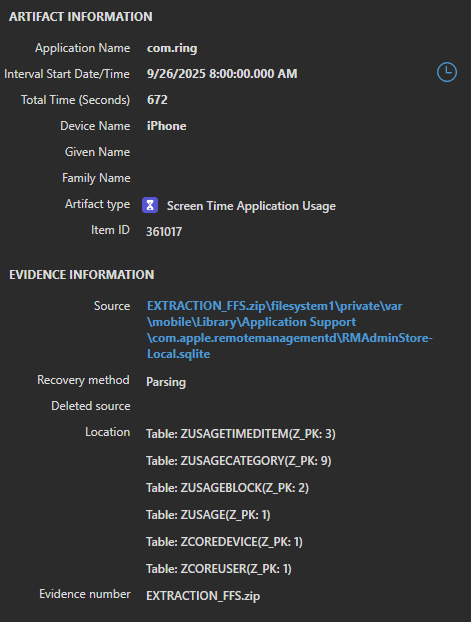
knowledgeC logged two usage intervals for Ring in that hour. Added together, they come to exactly 672 seconds.
| knowledgeC interval | Duration |
|---|---|
| 08:39:55 – 08:49:01 | 546 s |
| 08:55:01 – 08:57:07 | 126 s |
| Total | 672 s |
Picture in Picture counts as use
The first knowledgeC interval runs from 08:39:55 all the way to 08:49:01. That includes the roughly three minutes Ring spent in Picture in Picture while I was using ChatGPT. Biome saw it differently. Its Ring record for the same session ended at 08:45:20, when I switched to ChatGPT, and a new Ring record started at 08:48:03, when I expanded the video back to full screen.
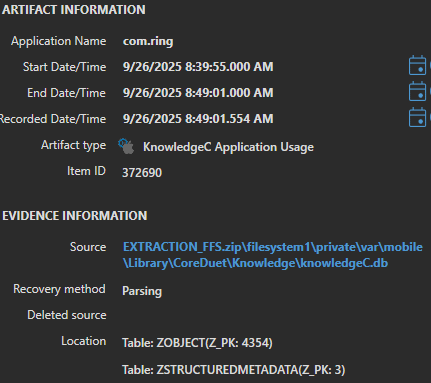
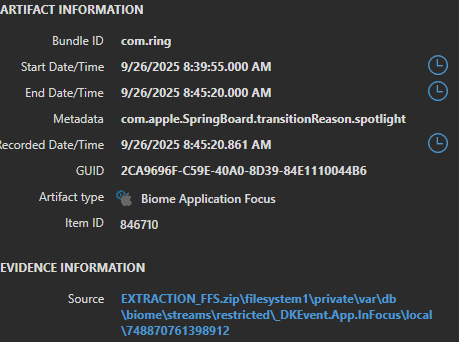
Screen Time's 672 seconds only works if the Picture in Picture time is included. So Screen Time follows knowledgeC here, not Biome.
During the same few minutes, knowledgeC also logged ChatGPT as in use from 08:45:44 to 08:47:04. Two apps were "in use" at the same time. I didn't test how Screen Time adds up overlapping apps, but don't assume the per-app totals for an hour will add up to the time the screen was actually on.
Actions in the 9:00 hour
| Time | Action |
|---|---|
| 09:00 | Unlocked the phone, straight back into Ring. Live View had disconnected, so I reconnected it, then ended it at 09:00:50 and left the app open. |
| 09:03 | Played a motion clip recorded at 05:58 that morning |
| 09:04 | Deleted the 08:56 and 09:00 Live View recordings |
| 09:06 | Minimized Ring |
| 09:07 | Switched between ChatGPT and Ring seven times, ending on ChatGPT |
| 09:10 | Launched Ring |
| 09:23 | Swiped down to Control Center, turned off Wi-Fi, and went straight back to Ring |
| 09:25 | Closed Ring completely and locked the phone |
What Screen Time recorded
Screen Time stored 1,289 seconds for Ring in the hour starting at 9:00, with one pickup and one notification.
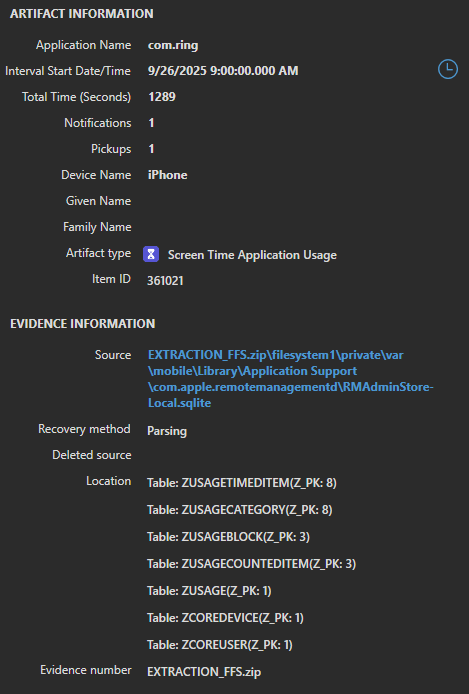
Again, the knowledgeC intervals add up exactly.
| knowledgeC interval | Duration | What was happening |
|---|---|---|
| 09:00:06 – 09:06:07 | 361 s | Unlocked into Ring, Live View, clip playback, deletions |
| 09:07:05 – 09:07:09 | 4 s | Seven quick switches between ChatGPT and Ring |
| 09:07:12 – 09:07:16 | 4 s | |
| 09:07:21 – 09:07:25 | 4 s | |
| 09:07:28 – 09:07:31 | 3 s | |
| 09:07:35 – 09:07:39 | 4 s | |
| 09:07:42 – 09:07:48 | 6 s | |
| 09:07:51 – 09:07:56 | 5 s | |
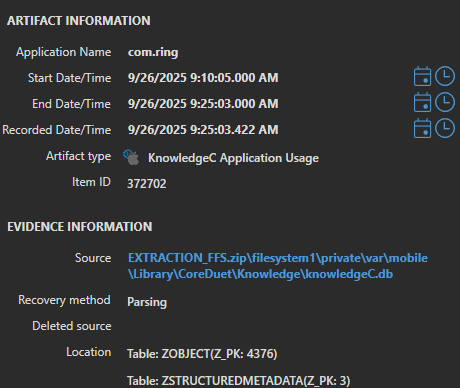
| 09:10:05 – 09:25:03 | 898 s | Ring open, including the Control Center trip |
| Total | 1,289 s |
Even the four-second switches were counted. Screen Time doesn't round them away.
Control Center didn't interrupt the count
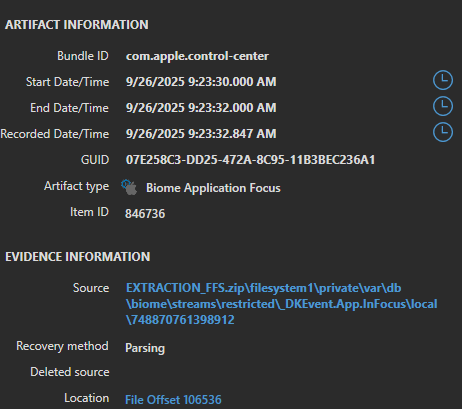
At 09:23 I pulled down Control Center to turn off Wi-Fi. Biome logged that as a separate focus event: Ring ended at 09:23:30, com.apple.control-center was in focus until 09:23:32, and a new Ring record started at 09:23:32. knowledgeC kept Ring as one unbroken interval from 09:10:05 to 09:25:03, and Screen Time's total only works with that unbroken interval.
Pickups
Seven app switches produced no pickups. The one pickup in the 9:00 hour lines up with 09:00:04, when the phone was unlocked after being locked since 08:57:07 and Ring was the first app on screen. That fits how Screen Time presents pickups in Settings, where each one is credited to the app first used after the phone is picked up.
My notes don't show whether the phone was locked before I first launched Ring at 08:39, so the lack of a pickup in the 8:00 hour doesn't tell us anything either way. The single notification in the 9:00 hour wasn't tied to any action I logged, so I can't say where it came from.
Summary
| Situation | Screen Time | knowledgeC | Biome |
|---|---|---|---|
| App in the foreground | Counted | In use | In focus |
| App in Picture in Picture | Counted | In use | Not in focus |
| Control Center pulled down over the app | Counted | In use | Separate Control Center event |
| App in the background | Not counted | Not in use | Not in focus |
| Screen locked | Not counted | Not in use | Not in focus |
| Switching between apps | Each few seconds counted, no pickup | Separate short intervals | Separate short intervals |
| Unlock straight into the app | One pickup | Lock state change | Keybag lock state change |
How to use this in casework
- Confirm Screen Time was turned on. If
RMAdminStore-Local.sqlitehas no usage data, that may only mean the feature was off. - Remember that Screen Time gives you a total per hour, not a start and end time. Use knowledgeC and Biome to place the usage inside the hour.
- Add up the knowledgeC
/app/usageintervals for the app in that hour and compare them to the Screen Time total. A match tells you which intervals make up the number. - Don't expect Biome to match Screen Time. Biome splits a session for Picture in Picture and Control Center. Those splits are useful detail, but the totals won't line up.
- If Picture in Picture was possible, say so. An app can be "in use" in Screen Time and knowledgeC while the user is looking at a different app.
- Treat pickups as unlock events credited to the first app opened, not as a count of how many times the app was opened.
Limits of this test
- One device, one iOS version, one app with Screen Time turned on, and two hours of data.
- Screen Time was only on for the Ring test, so the Blink actions could not be compared.
- Screen Time totals across several apps in the same hour were not compared, so how it handles overlapping apps is untested.
- Screen Time sync from other devices on the same Apple Account was not tested.
- Times in the action logs were written by hand, so allow a few seconds of difference from the recorded values.
Run the same test on your own device and iOS version before you rely on this in a report.
Bottom line
In this test, Screen Time's hourly app total was the sum of the app's knowledgeC usage intervals, down to the second. That makes it a solid number, as long as you understand what it includes: Picture in Picture time counts, background and locked time doesn't, and a pickup means an unlock, not an app launch. And if Screen Time was never turned on, there's no number to find.
Testing completed by Major Ricky Johnson, Richland County Sheriff's Department.